


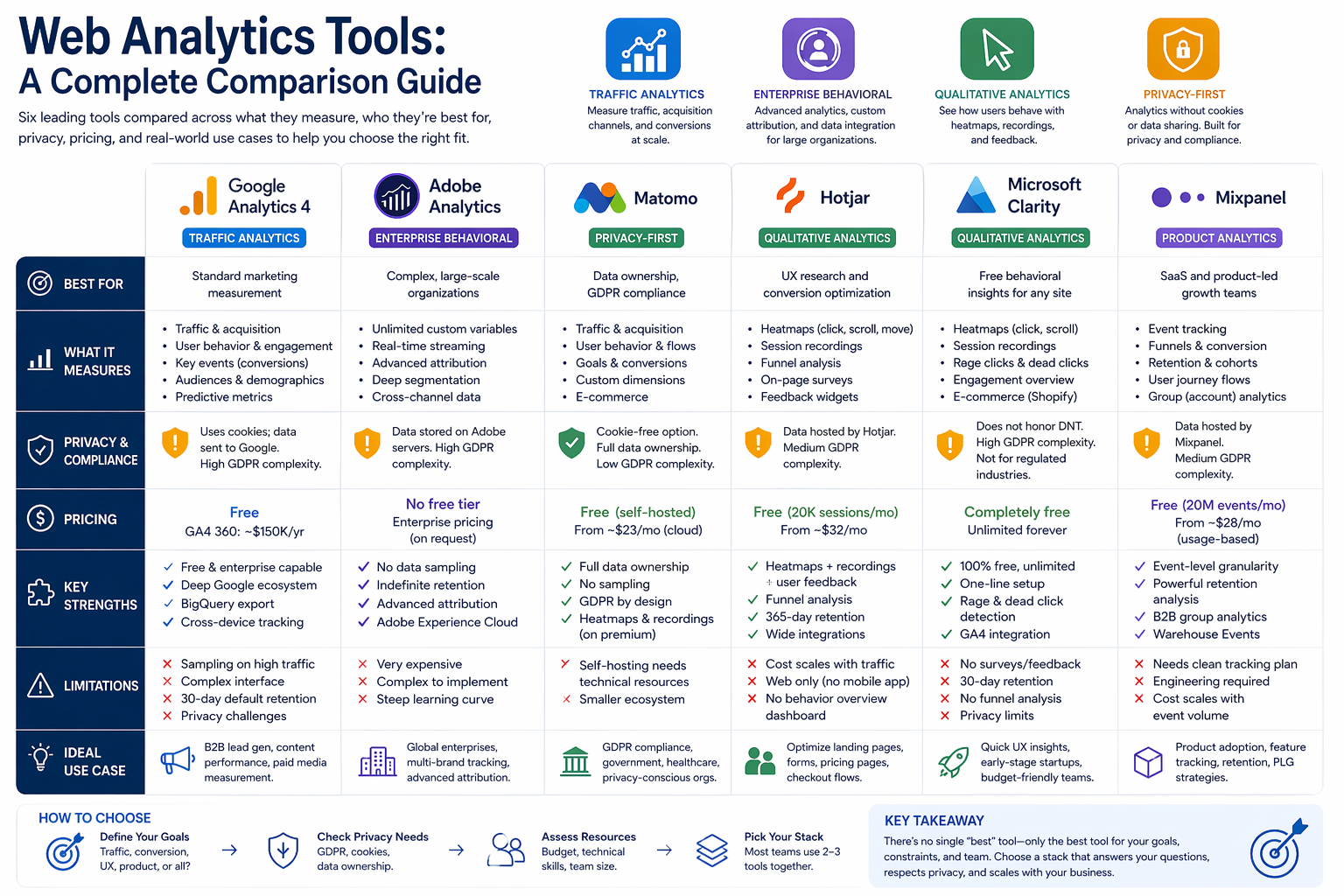
Web Analytics Tools: A Complete Comparison Guide
Picking the right web analytics tool is one of the most important technical decisions I see marketing analytics teams get wrong. Not because they choose a bad tool — but because they choose a good tool for the wrong situation.
The market offers dozens of platforms today. Some measure traffic. Some visualize user behavior. Some protect privacy. Some power product teams. And most organizations default to whatever their developer installed three years ago without asking whether it still fits what they actually need to measure.
In this guide I compare the six most widely used web analytics tools across the dimensions that matter most to practitioners: what they measure, who they serve best, how they handle privacy, and where they genuinely shine versus where they fall short. I also include concrete use cases for each tool so you can see exactly when each one earns its place in a real analytics stack.
How I Categorize Web Analytics Tools
Before comparing individual platforms, I want to establish a clear framework. The web analytics market has organized itself into four distinct categories, and understanding these categories saves a lot of confusion when teams try to compare tools that are solving fundamentally different problems.
Traffic analytics platforms measure where visitors come from, what pages they visit, and how they engage in aggregate. They answer acquisition and channel performance questions at scale. Google Analytics 4 dominates this category.
Enterprise behavioral analytics platforms combine deep traffic measurement with advanced segmentation, custom attribution, and data integration at a scale that smaller tools cannot handle. Adobe Analytics sits here.
Qualitative analytics tools add visual and perceptual intelligence on top of quantitative data. They show not just what users did, but where they clicked, how far they scrolled, and where they gave up. Hotjar and Microsoft Clarity belong to this category.
Privacy-first analytics platforms deliver traffic and engagement data without cookies, consent banners, or third-party data sharing. Matomo and Plausible Analytics lead this segment.
Most mature analytics stacks combine tools from two or three categories. The right combination depends on team size, technical capability, privacy requirements, and the specific questions the analytics function needs to answer.
The Six Tools I Cover in This Guide
| Tool | Category | Best For | Pricing |
|---|---|---|---|
| Google Analytics 4 | Traffic analytics | Standard marketing measurement | Free / Enterprise paid |
| Adobe Analytics | Enterprise behavioral analytics | Complex, large-scale organizations | Enterprise, on request |
| Matomo | Privacy-first analytics | Full data ownership, GDPR compliance | Free self-hosted / Cloud paid |
| Hotjar | Qualitative behavioral analytics | UX research, conversion optimization | Free tier / From ~$32/mo |
| Microsoft Clarity | Qualitative behavioral analytics | Free behavioral insights | Completely free |
| Mixpanel | Product and event analytics | SaaS and product-led growth teams | Free tier / Usage-based paid |
1. Google Analytics 4 (GA4)
Google Analytics 4 is the most widely adopted web analytics platform in the world. As of 2025, it runs on approximately 37.9 million websites — around 55% of all sites using web analytics tools. Google replaced Universal Analytics with GA4 in July 2023, introducing a fundamentally different event-based data model that changed how teams capture and report user behavior.
What GA4 Measures
GA4 treats every user interaction as an event. A page view, a button click, a scroll, a video play, a form submission — GA4 captures all of these as events with associated parameters. This model gives teams far more flexibility than the old session-based approach and enables more granular behavioral analysis without requiring custom code for basic interactions.
GA4 measures:
- Traffic acquisition — organic search, paid media, direct, referral, email, and social channels with full UTM parameter tracking
- User behavior — page views, scroll depth, time on page, outbound clicks, and site search activity
- Conversion events — called Key Events since Google’s 2024 nomenclature update, configured to track high-value actions like form submissions, demo requests, and purchases
- Audience segments — demographic, geographic, device type, and behavioral audience cuts
- Predictive metrics — AI-generated purchase probability, churn probability, and revenue predictions for e-commerce properties
- Cross-device tracking — unified user journeys across web and mobile app properties in a single property
Who Uses GA4
Marketing analytics teams, digital analysts, SEO specialists, paid media managers, and content teams all use GA4 as their primary traffic measurement layer. At most organizations, GA4 is the baseline analytics tool that everyone references — the shared source of truth for traffic volume, acquisition channel performance, and top-level conversion rates.
GA4 Strengths
GA4’s integration with Google’s broader ecosystem is its single biggest advantage. It connects natively with:
- Google Ads — campaign performance data flows directly into GA4, enabling end-to-end measurement from ad impression to on-site conversion without manual data reconciliation
- Google Search Console — organic search query data surfaces inside GA4 reports
- Google BigQuery — raw, event-level GA4 data exports to BigQuery for advanced SQL-based analysis, a feature previously available only in the paid enterprise version
- Looker Studio — GA4 data feeds directly into Looker Studio dashboards for custom reporting
The free tier gives teams access to capabilities that enterprise tools charge hundreds of thousands of dollars for annually.
GA4 Limitations
GA4 has real limitations that teams need to understand before treating it as their only analytics tool:
- Interface complexity — the transition from Universal Analytics has frustrated many users, and the GA4 interface remains significantly less intuitive than its predecessor
- Data sampling — high-traffic properties hit sampling thresholds in standard reports, which means the data teams see is an estimate, not a precise count
- Privacy compliance challenges — GA4 uses cookies by default and sends data to Google’s servers, creating genuine GDPR compliance complications for organizations operating under European data regulations
- 30-day data retention limit — the default data retention window in GA4 is only two months, requiring deliberate configuration changes to extend it, and historical user-level data still has an upper cap of 14 months
Real-World Use Cases
Use Case 1: B2B SaaS Lead Generation Measurement A B2B software company runs paid search, LinkedIn ads, and content marketing simultaneously. Their marketing analytics manager uses GA4 to monitor which channels drive demo request completions, tracks the cost-per-conversion for each channel using UTM parameters, and exports raw event data to BigQuery weekly for attribution modeling. GA4 gives them the unified traffic view and Google Ads integration they need without paying for an enterprise platform.
Use Case 2: Content Performance Analysis A marketing team publishing 20+ articles per month uses GA4’s engagement metrics — engagement rate, average engagement time, and scroll depth — to identify which content topics attract the most qualified organic traffic. They connect GA4 to Search Console to see which articles rank for high-intent keywords and drive the most form completions, then feed those insights back into their editorial calendar.
When GA4 Fits Best:
- Teams that run Google Ads campaigns and need integrated campaign-to-conversion measurement
- Organizations that want enterprise-grade traffic analytics at zero cost
- Teams with technical resources to configure BigQuery export for advanced analysis
- Any organization where marketing analytics is the primary use case, not product analytics
When GA4 Does Not Fit:
- Organizations operating under strict GDPR requirements where data sovereignty is non-negotiable
- Teams that need unlimited historical data retention without workarounds
- Product teams who need to track individual user journeys inside a SaaS application — GA4 is a web analytics tool, not a product analytics tool
2. Adobe Analytics
Adobe Analytics is the enterprise-grade standard for organizations that need more analytical depth, more customization, and more data integration capability than GA4 provides. It sits inside the Adobe Experience Cloud alongside Adobe Target, Adobe Campaign, and Adobe Experience Manager, giving large organizations a tightly integrated marketing technology ecosystem.
What Adobe Analytics Measures
Adobe Analytics uses the same fundamental behavioral data as GA4 — traffic sources, page views, user actions, conversion events — but extends the measurement architecture significantly:
- Unlimited custom variables — Adobe’s props, eVars, and events system gives teams complete flexibility to define and track any behavioral dimension the business needs
- Real-time data streaming — Adobe’s Live Stream feature surfaces raw behavioral data with a 30-90 second delay, enabling near-real-time campaign monitoring at enterprise scale
- Unlimited attribution models — Adobe provides a full library of attribution models — first touch, last touch, linear, time decay, participation, and custom algorithmic models — applicable to both paid and organic channels
- Advanced segmentation — Adobe’s segment builder supports sequential segmentation, nested logic, and container-based segment architecture that produces analytical cuts unavailable in simpler tools
- Data Workbench — a powerful workspace environment where analysts build custom funnels, flow analyses, cohort studies, and statistical models without SQL
Who Uses Adobe Analytics
Adobe Analytics serves large enterprises — typically organizations with annual revenues above $100 million, complex multi-brand digital properties, dedicated analytics engineering teams, and significant paid media budgets that require sophisticated attribution.
According to Matomo’s comparison research, Adobe Analytics offers “better custom reports and audience segmentation to help with marketing and traffic analysis” compared to product analytics alternatives — making it the tool of choice when the primary need is deep marketing analytics rather than product intelligence.
Adobe Analytics Strengths
- No data sampling — Adobe Analytics processes every data point without statistical sampling, which matters enormously for high-traffic properties where sampled GA4 reports introduce material inaccuracies
- Indefinite data retention — Adobe retains historical data without the time-based limitations that GA4 imposes, enabling genuine year-over-year trend analysis
- Adobe Experience Cloud integration — teams using Adobe Target for A/B testing, Adobe Campaign for email, and Adobe Experience Manager for content get a single, fully integrated data layer across the entire customer experience stack
- Classification and Data Connector ecosystem — Adobe’s SAINT classification system and extensive connector library allow teams to enrich behavioral data with CRM, offline, and third-party data sources at scale
Adobe Analytics Limitations
- Cost — Adobe Analytics pricing starts in the tens of thousands of dollars annually and scales significantly with data volume and feature tier. The enterprise investment requires substantial organizational commitment to justify
- Implementation complexity — deploying Adobe Analytics correctly requires dedicated technical resources. Organizations without a dedicated analytics engineering function consistently underutilize the platform
- Steep learning curve — Analysis Workspace, Adobe’s primary reporting environment, is powerful but demands significant training investment before analysts can use it effectively
Real-World Use Cases
Use Case 1: Multinational Retail Brand A global retailer operating across 12 countries and four brands uses Adobe Analytics to maintain a unified measurement framework across all properties. Their analytics team uses Adobe’s classification system to align regional campaign naming conventions, applies custom eVars to track product category affinity across sessions, and builds multi-touch attribution reports that distribute revenue credit across search, email, display, and in-store touchpoints without sampling distortion.
Use Case 2: Financial Services Content Hub A major bank’s digital marketing team runs a content hub generating millions of monthly visits. They use Adobe Analytics to segment visitors by relationship status (existing customer vs. prospect), track content engagement by financial product category, and build sequential segments that identify the content journeys most predictive of product application completions — insights that directly inform their editorial investment decisions.
When Adobe Analytics Fits Best:
- Large enterprises with dedicated analytics engineering resources and significant platform investment capacity
- Organizations that need zero data sampling on high-traffic properties
- Teams deeply invested in the Adobe Experience Cloud ecosystem
- Complex multi-brand or multinational digital operations requiring a unified measurement architecture
When Adobe Analytics Does Not Fit:
- Small and mid-market organizations where the cost-to-value ratio cannot be justified
- Teams without the technical resources to implement and maintain the platform correctly
- Organizations that need a tool their entire marketing team can use without specialized training
3. Matomo
Matomo is the leading open-source, privacy-focused web analytics platform. Over one million websites across 190 countries run Matomo. It delivers the analytical depth of GA4 — traffic acquisition, behavioral analysis, conversion tracking, funnel analysis, goal measurement — while giving organizations complete ownership of their data and genuine GDPR compliance by design, not by workaround.
What Matomo Measures
Matomo measures the same core behavioral dimensions as GA4:
- Traffic sources and acquisition channels
- Page views, bounce rate, time on page, and user flows
- Conversion goals and funnels
- Audience segments by geography, device, browser, and behavior
- Custom events and dimensions
- Ecommerce transactions and revenue attribution
What makes Matomo structurally different from GA4 is where the data goes. Organizations self-hosting Matomo store all behavioral data on their own servers. No third party — including Matomo itself — has access to it. This makes Matomo the analytically credible answer to the question: “Can we measure our site properly without sending data to Google?”
Matomo Strengths
- Full data ownership — self-hosted Matomo means the organization controls its data entirely. No sampling, no data sharing, no third-party access
- GDPR compliance by architecture — Matomo operates in cookieless mode by default, eliminating the consent banner requirement for basic tracking under European data regulations
- No data sampling — Matomo processes 100% of visits without statistical estimation, giving teams precise numbers rather than approximations
- GA4 feature parity — Matomo’s core analytics functionality covers the standard web analytics use cases GA4 handles, with the addition of built-in heatmaps, session recordings, and A/B testing on premium plans
Matomo Limitations
- Self-hosting requires technical resources — running Matomo on your own server demands a level of technical maintenance that smaller teams often underestimate
- Smaller ecosystem — Matomo has fewer native integrations and a smaller community of third-party tools compared to GA4
- Cloud pricing scales — the managed cloud version eliminates hosting complexity but introduces per-visit pricing that can become significant for high-traffic properties
Real-World Use Cases
Use Case 1: European Healthcare Organization A healthcare provider operating across Germany, France, and the Netherlands cannot route patient-adjacent behavioral data through Google’s servers under their GDPR compliance framework. They deploy self-hosted Matomo on their own infrastructure, configure cookieless tracking, and measure site performance — page engagement, content downloads, appointment form completions — with full regulatory confidence and zero consent banner friction.
Use Case 2: Government and Public Sector A regional government agency runs a citizen services portal. They use self-hosted Matomo to track service page engagement, form completion rates, and search behavior — all data that must remain on government-controlled infrastructure. They produce the same traffic and conversion reports a commercial marketing team would, but with complete data sovereignty.
Use Case 3: Privacy-Conscious SaaS Company A B2B SaaS company building its brand around data ethics uses Matomo Cloud to measure marketing performance without the philosophical contradiction of sending customer behavioral data to Google. They use Matomo’s built-in heatmaps to optimize their pricing page, and their marketing team gets the channel performance reports they need without the cookie consent complexity.
When Matomo Fits Best:
- Organizations operating under strict European data protection regulations
- Public sector and government organizations with data sovereignty requirements
- Companies with privacy as a core brand value who need credible, compliant analytics
- Any organization willing to invest in self-hosting to achieve complete data control
When Matomo Does Not Fit:
- Teams that need the depth of Google Ads integration that only GA4 provides
- Organizations without technical resources to manage self-hosted infrastructure
- Teams that rely on the GA4 + BigQuery workflow for advanced modeling
4. Hotjar
Hotjar is the behavioral analytics and user feedback platform that fills the qualitative gap that traffic analytics tools like GA4 cannot fill. GA4 tells you that 68% of users leave your pricing page without converting. Hotjar shows you why — they scroll past the pricing table, miss the CTA button, and abandon after reading the fine print section.
Hotjar combines heatmaps, session recordings, and direct user feedback tools in a single platform. Now part of Contentsquare, it serves over 900,000 organizations.
What Hotjar Measures
Hotjar’s measurement framework has two layers — behavioral data and qualitative feedback:
Behavioral data:
- Heatmaps — click maps showing where users click, scroll maps showing how far they read, move maps tracking where users move their cursor (a useful proxy for visual attention), and engagement maps combining all three signals
- Session recordings — full replay of individual user sessions showing every click, scroll, pause, rage click, and U-turn in real time
- Funnel analysis — step-by-step conversion funnel visualization showing where users drop off across multi-step flows like checkout, signup, or lead generation forms
Qualitative feedback:
- On-page surveys — short surveys deployed at specific behavioral triggers (exit intent, scroll depth, time on page, specific page visits)
- Feedback widgets — persistent widgets where visitors can rate pages or leave comments in real time
- User interviews — Hotjar’s Engage feature connects teams with recruited users for moderated research sessions
This combination of behavioral observation and direct user voice makes Hotjar uniquely capable of answering the “why” questions that quantitative tools cannot reach.
Hotjar Strengths
- The only tool that connects behavioral data to user feedback — heatmaps show where users struggle; surveys collect the explanation directly from those users. No other tool at this price point combines both
- Funnel analysis — Hotjar includes a built-in funnel tool that visualizes drop-off across multi-step conversion flows, a feature Microsoft Clarity does not offer
- 365-day data retention — paid plans retain session recordings and analytics data for up to a year, enabling seasonal trend comparison and long-term UX research
- Broad integration ecosystem — Hotjar integrates with GA4, Mixpanel, Segment, HubSpot, Slack, Jira, Optimizely, and over 1,000 tools via Zapier, making it compatible with virtually any existing analytics stack
Hotjar Limitations
- Cost at scale — Hotjar’s free tier limits teams to 20,000 monthly sessions, and paid plans scale in cost with traffic volume. Medium-traffic sites can spend $2,000+ annually for unlimited recording access
- Web only — Hotjar does not support native mobile app analytics. Teams with both web and app properties need a separate tool for mobile behavior
- No behavioral overview dashboard — unlike Microsoft Clarity, Hotjar does not provide an aggregated behavioral trend view across the site. Teams access insights through individual heatmaps and recordings rather than a site-wide behavioral summary
Real-World Use Cases
Use Case 1: SaaS Pricing Page Optimization A B2B SaaS company sees their pricing page generating substantial traffic but converting at 2.3% against an industry benchmark of 4-6%. Their product marketing team deploys Hotjar heatmaps and identifies that most users scroll past the pricing tiers without interacting with the plan comparison table. Session recordings reveal users frequently rage-click on a section heading they mistake for a button. An on-page survey on exit intent collects direct responses — 43% say they cannot find information about enterprise pricing. The team adds a visible “contact sales” CTA at the comparison table, fixes the misleading heading, and adds a dedicated enterprise tier section. Conversion rate lifts to 4.1% within six weeks.
Use Case 2: Lead Generation Form Optimization A marketing team notices that their contact form completion rate dropped 18% month-over-month following a site redesign. Hotjar funnel analysis shows users reach step 3 of the 4-step form and abandon. Session recordings of those abandoned sessions reveal that a new dropdown field requiring company revenue selection — added during the redesign — triggers significant hesitation and exit. The team removes the field, reducing form length from 8 to 7 fields. Completion rate recovers within two weeks.
When Hotjar Fits Best:
- Conversion rate optimization teams who need to understand why users abandon specific pages or flows
- UX researchers who need both behavioral observation and direct user feedback in one platform
- Teams running A/B tests who need qualitative context to explain quantitative results
- Any organization willing to invest in behavioral analytics beyond what free tools provide
When Hotjar Does Not Fit:
- Teams on tight budgets who need basic behavioral insights at zero cost — Microsoft Clarity serves this need adequately
- Organizations with mobile apps as their primary product — Hotjar does not support native app tracking
- Teams who need behavioral analytics combined with full product analytics capabilities
5. Microsoft Clarity
Microsoft Clarity is a completely free behavioral analytics tool from Microsoft that provides session recordings, heatmaps, and click analysis with no session limits, no data caps, and no paid tiers. It installs with a single line of code and integrates directly with GA4 and Google Ads, making it the most accessible behavioral analytics tool available.
What Microsoft Clarity Measures
Clarity focuses on behavioral observation rather than traffic analytics:
- Heatmaps — click maps and scroll maps showing where users engage across every page on the site
- Session recordings — full replay of user sessions including clicks, scrolls, mouse movements, and page navigation
- Behavioral signals — automatic detection and flagging of rage clicks (repeated frustrated clicking), dead clicks (clicks on non-interactive elements), excessive scrolling, and JavaScript errors
- Engagement overview — an aggregated behavioral dashboard summarizing session quality, dead click rates, rage click rates, and scroll depth patterns across the site
- Ecommerce metrics — for Shopify stores, Clarity provides built-in checkout abandonment, purchase, and product view metrics without additional configuration
Microsoft Clarity Strengths
- Completely free with unlimited sessions — Clarity provides unlimited heatmaps and session recordings at no cost with no usage caps. This single factor makes it the default behavioral analytics layer for budget-conscious teams and early-stage organizations
- One-line installation — teams deploy Clarity in minutes. There is no complex configuration, no tag management requirement, and no technical expertise needed beyond copying a script tag
- Native GA4 integration — Clarity connects directly to GA4, adding behavioral context to existing traffic data. Teams can filter session recordings by GA4 segments, meaning they can watch sessions from specific campaigns, acquisition channels, or audience groups
- Rage click and dead click detection — Clarity automatically surfaces pages with unusually high frustration signals, helping teams prioritize UX fixes without manually watching thousands of recordings
Microsoft Clarity Limitations
- No feedback tools — Clarity has no surveys, feedback widgets, or any mechanism for collecting qualitative input from users. Teams can see what users do but cannot ask them why
- 30-day data retention — Clarity stores session recordings and heatmap data for only 30 days. Teams cannot reference behavior from the previous quarter or compare seasonal patterns
- No funnel analysis — Clarity does not include multi-step funnel visualization. Teams cannot measure where users drop off across a defined conversion sequence
- Privacy concerns in regulated industries — Clarity does not respect “Do Not Track” browser signals and does not provide a built-in mechanism for handling individual data deletion requests under GDPR’s right to erasure. Microsoft also restricts Clarity use on healthcare, financial services, and government websites
Real-World Use Cases
Use Case 1: Early-Stage Startup with Zero Analytics Budget A B2B startup with a five-person team and a new marketing site installs Clarity in 10 minutes to get immediate behavioral visibility. The team uses the rage click detection to identify that their homepage CTA button is not registering clicks on mobile — a JavaScript error they did not catch in testing. They fix the issue within 24 hours. Clarity’s dead click report also reveals that users frequently click on a decorative icon in the hero section, treating it as a navigation element. The team converts it into a working link to the product demo page. Both fixes happen without spending any money on analytics tooling.
Use Case 2: Complementing GA4 with Behavioral Context A marketing analytics manager at a mid-market company uses GA4 for traffic and campaign measurement. They add Clarity as a free behavioral layer and connect the two platforms. When GA4 reports a spike in exit rate on the product comparison page following a site update, the manager filters Clarity session recordings by the “comparison page” segment and watches 15 recordings. Three patterns emerge within an hour: users on mobile cannot horizontally scroll the comparison table, the page load time on mobile creates a blank screen period that triggers exits, and the most important feature row appears below the fold. Each issue is actionable without any additional analytical work.
When Microsoft Clarity Fits Best:
- Teams who need behavioral analytics immediately with zero budget and zero setup time
- Organizations already using GA4 who want to add a behavioral layer without paying for Hotjar
- Small businesses and startups in their early growth phase
- Teams who need rage click and dead click detection as a quick UX diagnostic tool
When Microsoft Clarity Does Not Fit:
- Organizations in healthcare, financial services, or government — Microsoft explicitly prohibits Clarity on these sites
- Teams who need to reference historical behavioral data beyond 30 days
- Organizations who need direct user feedback tools alongside behavioral observation
- Teams with strict GDPR compliance requirements around data deletion and Do Not Track
6. Mixpanel
Mixpanel pioneered event-based behavioral analytics and remains the leading platform for product teams who need to understand how users engage with specific features inside a digital product — not just how they navigate a marketing site. Mixpanel tracks specific actions: button clicks, feature activations, API calls, and in-app user journeys, providing the granular event intelligence that product-led growth strategies depend on.
What Mixpanel Measures
Mixpanel organizes its measurement around events, users, and time — making it structurally different from traffic analytics tools:
- Event tracking — every user action the team defines becomes a trackable event with associated properties. Mixpanel captures these at the individual user level, not just in aggregate
- Funnel analysis — step-by-step conversion analysis showing where users drop off within defined event sequences, with the ability to break funnels down by user properties like plan tier, acquisition channel, or company size
- Retention analysis — cohort-based retention curves showing what percentage of users return to perform a target action at defined time intervals after their first interaction
- User journey flows — path analysis showing the actual sequences of events users take through a product, surfacing common patterns and unexpected detours
- Behavioral cohorts — user groups defined by event-based criteria (users who triggered Feature X in their first week, users who have not completed onboarding step 3) that teams can analyze and target for re-engagement
- Group analytics — account-level measurement for B2B products, aggregating individual user behavior up to the company or account level
Mixpanel Strengths
- Event-level granularity — Mixpanel’s data model gives teams visibility into individual user behavior that aggregate traffic tools like GA4 cannot replicate. Teams can ask: which specific users triggered this event, and what did they do before and after?
- Retention analysis depth — Mixpanel’s retention curves are the gold standard for SaaS product teams measuring feature adoption and engagement over time
- Warehouse Events integration — Mixpanel’s recent Warehouse Events feature allows teams to import event data directly from their data warehouse, eliminating the need for separate SDK instrumentation for events already captured elsewhere in the data stack
- B2B-ready group analytics — Mixpanel supports account-level analysis natively, making it substantially more useful for B2B product teams than most product analytics alternatives
Mixpanel Limitations
- Requires a clean tracking plan — Mixpanel’s power comes from deliberate event instrumentation. Teams that implement it without a structured tracking plan end up with a chaotic event library that is expensive to clean up and difficult to trust
- Engineering dependency — unlike GA4’s enhanced measurement, which tracks common events automatically, Mixpanel requires engineering involvement to instrument custom events correctly
- Cost at scale — Mixpanel’s pricing scales with event volume. At 1.5 million monthly events, teams pay approximately $140/month. At 3 million events, approximately $378/month. High-volume products face significant costs
Real-World Use Cases
Use Case 1: SaaS Onboarding Optimization A B2B SaaS company’s product team uses Mixpanel to diagnose low trial-to-paid conversion. They build a funnel from “trial signup” through the five activation steps their customer success team defines as the indicators of product value realization. Mixpanel reveals that 61% of trial users never complete step 3 — connecting their CRM integration. They filter that segment by company size and discover that the drop-off concentrates in companies with fewer than 50 employees, who predominantly use a CRM Mixpanel shows the product does not support natively. The product team adds a manual import option for that CRM. Trial-to-paid conversion in that segment lifts 22% in the following quarter.
Use Case 2: Feature Adoption Measurement A product analytics manager at a growth-stage SaaS company launches a new reporting feature. They use Mixpanel to track the event “report_created” over a 30-day cohort. Mixpanel’s retention analysis shows that users who create a report in their first week retain at 64% after 30 days — 18 percentage points higher than users who do not. This data drives a product decision: make report creation the primary call-to-action in the onboarding flow, replacing the previous step focused on dashboard setup.
When Mixpanel Fits Best:
- Product teams at SaaS companies who need to measure feature adoption, retention, and in-product user journeys
- Growth teams running product-led growth strategies where in-app behavior drives acquisition and expansion
- B2B product organizations who need account-level analytics alongside individual user data
- Teams with engineering resources to instrument events deliberately and maintain a clean tracking plan
When Mixpanel Does Not Fit:
- Marketing teams whose primary need is channel performance and traffic acquisition measurement — GA4 handles this better
- Teams without engineering resources to maintain event instrumentation
- Organizations looking for a free behavioral tool for basic site analysis — Microsoft Clarity or Matomo serve that need at zero cost
Head-to-Head Comparison: Six Perspectives
1. Pricing
| Tool | Free Tier | Paid Starting Price | Enterprise |
|---|---|---|---|
| GA4 | Full features free | GA4 360: ~$150K/year | GA4 360 |
| Adobe Analytics | None | On request | Select / Prime / Ultimate tiers |
| Matomo | Full features (self-hosted) | ~$23/mo (cloud) | Cloud Enterprise |
| Hotjar | 20K sessions/mo | ~$32/mo | Scale plans |
| Clarity | Unlimited, forever free | No paid tier | N/A |
| Mixpanel | 20M events/mo | ~$28/mo (growth) | Enterprise on request |
2. Privacy and GDPR Compliance
| Tool | Cookie-Free Option | Data Ownership | GDPR Complexity |
|---|---|---|---|
| GA4 | Consent Mode only | Google servers | High |
| Adobe Analytics | Partial | Adobe servers | High |
| Matomo | Yes, by default | Self-hosted or own cloud | Low |
| Hotjar | No | Hotjar servers | Medium |
| Clarity | No | Microsoft servers | High (regulated industries prohibited) |
| Mixpanel | No | Mixpanel servers | Medium |
3. Technical Complexity
| Tool | Implementation Difficulty | Ongoing Maintenance | Team Skill Required |
|---|---|---|---|
| GA4 | Medium | Medium | Marketing + some technical |
| Adobe Analytics | High | High | Dedicated analytics engineering |
| Matomo | Low (cloud) / High (self-hosted) | Low (cloud) / High (self-hosted) | Technical for self-hosting |
| Hotjar | Low | Low | Non-technical |
| Clarity | Very Low | Very Low | Non-technical |
| Mixpanel | High | High | Engineering + analytics |
4. Data Retention
| Tool | Default Retention | Maximum Retention |
|---|---|---|
| GA4 | 2 months (user data) | 14 months |
| Adobe Analytics | Indefinite | Indefinite |
| Matomo | Configurable | Configurable |
| Hotjar | Session length | 365 days (paid) |
| Clarity | 30 days | 30 days |
| Mixpanel | 90 days (free) | Indefinite (paid) |
5. Best Use Cases
| Tool | Traffic Analytics | Product Analytics | UX Research | Privacy Compliance | Enterprise Scale |
|---|---|---|---|---|---|
| GA4 | ★★★★★ | ★★☆☆☆ | ★☆☆☆☆ | ★★☆☆☆ | ★★★★☆ |
| Adobe Analytics | ★★★★★ | ★★★☆☆ | ★★☆☆☆ | ★★☆☆☆ | ★★★★★ |
| Matomo | ★★★★☆ | ★★☆☆☆ | ★★★☆☆ | ★★★★★ | ★★★☆☆ |
| Hotjar | ★★☆☆☆ | ★★☆☆☆ | ★★★★★ | ★★★☆☆ | ★★★☆☆ |
| Clarity | ★☆☆☆☆ | ★☆☆☆☆ | ★★★☆☆ | ★★☆☆☆ | ★★☆☆☆ |
| Mixpanel | ★★☆☆☆ | ★★★★★ | ★★☆☆☆ | ★★☆☆☆ | ★★★★☆ |
6. Integration Ecosystem
| Tool | Google Ads | CRM | Data Warehouse | A/B Testing | CDP |
|---|---|---|---|---|---|
| GA4 | Native | Limited | BigQuery native | Google Optimize* | Limited |
| Adobe Analytics | Yes | Adobe Campaign | Adobe Experience Platform | Adobe Target | Yes |
| Matomo | Yes | Via connector | Custom | Built-in (paid) | Limited |
| Hotjar | Via GA4 | HubSpot, Salesforce | Limited | Optimizely, VWO | Via Segment |
| Clarity | Via GA4 | Via GA4 | Power BI | AB Tasty, Optimizely | Limited |
| Mixpanel | Limited | HubSpot, Salesforce | Warehouse Events | Built-in | Via Segment |
How to Choose the Right Tool Stack
Based on my experience working across B2B analytics environments, I recommend thinking about tool selection in three layers, not as a single-tool decision.
Layer 1: Your Primary Traffic Analytics Tool
Every organization needs one primary tool for traffic measurement, channel performance, and conversion tracking. For most teams, GA4 is the right answer — it is free, deeply integrated with Google’s ad ecosystem, and capable enough for standard marketing analytics use cases. The only exception is organizations with genuine GDPR data sovereignty requirements, where Matomo becomes the appropriate primary choice.
Layer 2: Your Behavioral Intelligence Layer
Add a qualitative analytics tool on top of your traffic analytics platform to answer the “why” questions your traffic data surfaces. If your budget is zero, start with Microsoft Clarity immediately — there is no argument for not having it running. If you have budget and need user feedback alongside behavioral observation, Hotjar is the investment that pays back fastest through conversion optimization.
Layer 3: Your Specialized Analytics Layer
If your organization runs a SaaS product and needs to measure in-product user behavior, feature adoption, and retention, add Mixpanel as your product analytics layer. If you operate at enterprise scale with complex multi-brand digital properties, Adobe Analytics replaces GA4 as your primary tool.
Recommended Stack Configurations
Early-stage startup or small marketing team: GA4 + Microsoft Clarity — free, powerful, deployable in under an hour
Mid-market B2B with active CRO program: GA4 + Hotjar — traffic measurement plus behavioral and qualitative insights
SaaS company with product-led growth: GA4 (marketing site) + Mixpanel (product) + Microsoft Clarity (behavioral layer)
Privacy-regulated or European organization: Matomo (self-hosted) + Hotjar or Clarity
Large enterprise: Adobe Analytics + Hotjar + Mixpanel (if applicable)
Key Takeaways
Web analytics tools are not interchangeable. Each one solves a distinct measurement problem, and choosing the right combination matters more than choosing the most popular single tool.
I recommend every analytics team starts with three honest questions before selecting any platform:
- What questions do I actually need to answer? Traffic volume, channel attribution, user behavior, feature adoption, and conversion drop-off all require different tools.
- What are my privacy and compliance constraints? If GDPR compliance is non-negotiable, that requirement filters the candidate list significantly before any feature comparison begins.
- What technical resources do I have available? The most powerful tools require the most maintenance. An under-resourced team running Adobe Analytics will generate less analytical value than a focused team running GA4 and Hotjar correctly.
The analytics tool is not the strategy. It is the infrastructure that makes the strategy measurable. Choose infrastructure that fits the team’s actual capability and the business’s actual measurement needs — not the tool with the most impressive feature list.
References and Further Reading
- Google Analytics 4 — Official Platform — Google’s official GA4 product page including documentation, setup guides, and feature overview
- Matomo — Web Analytics Tools Comparison — Matomo’s independent overview of ten major web analytics platforms including GA4, Adobe, and Mixpanel with feature-by-feature analysis
- Hotjar — Official Platform — Hotjar’s product documentation covering heatmaps, session recordings, surveys, and funnel analysis capabilities
- Microsoft Clarity — Official Platform — Microsoft’s official Clarity page with setup instructions, feature documentation, and GA4 integration guide
- Mixpanel — Official Platform — Mixpanel’s product overview including event tracking architecture, retention analysis, and pricing documentation
- Spotsaas — Best Web Analytics Tools 2026 — Independent analyst comparison covering GA4, Plausible, Matomo, and privacy-first alternatives with current pricing data
- Adobe Analytics — Official Platform — Adobe’s enterprise analytics platform overview within the Adobe Experience Cloud
This article is part of the Tools and Technology category. Related reading: