


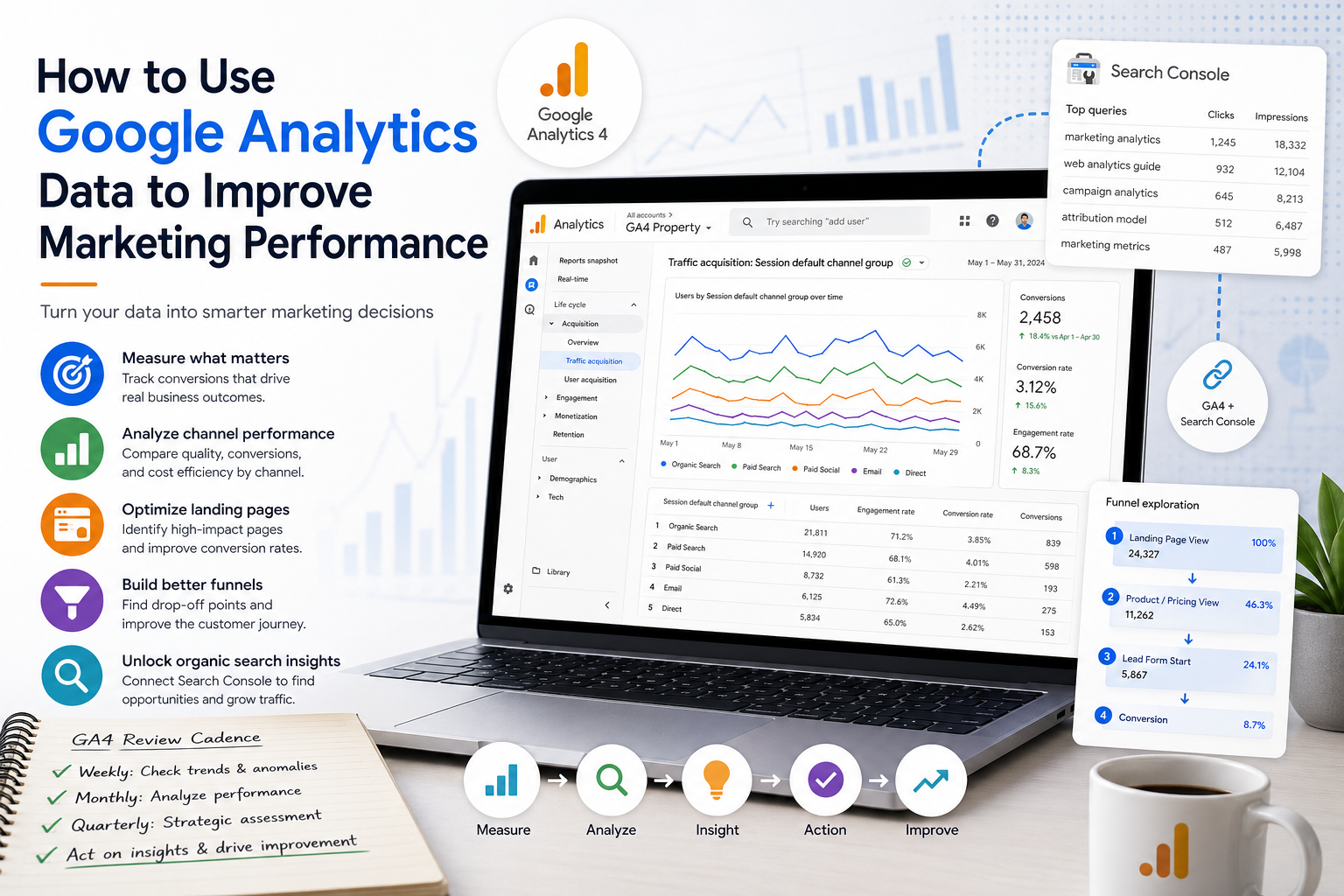
How to Use Google Analytics Data to Improve Marketing Performance
Google Analytics is one of the most widely deployed analytics tools in the world, and also one of the most consistently misused. Most marketing teams have it installed. Far fewer have it configured to answer the questions that actually matter for marketing performance decisions. And a significant portion of the teams that do have it configured correctly are still looking at the wrong reports to inform those decisions.
This guide is not a setup walkthrough. It assumes you have GA4 running on your site with conversion tracking in place. What it covers is how to extract genuine marketing performance intelligence from the data you are already collecting — moving from traffic reporting to decision-making. If you need a foundation on what web analytics measures and why it matters before getting to the how, my guide to web analytics is the right starting point.
The Problem with How Most Teams Use GA4
Most analytics usage follows a predictable pattern: check sessions and traffic sources weekly, review conversion numbers monthly, report channel performance in a slide deck. This is measurement theater. It generates activity and confidence without generating decisions.
The teams that get genuine value from GA4 use it differently. They start with a marketing question — which channels are acquiring customers with the highest lifetime value? Which landing pages are destroying our paid search ROI? What content is actually building the audience we want? — and then pull the reports that answer that specific question. The difference is orientation. Question-first versus data-first.
Before we get into specific techniques, that reorientation matters. GA4 is a tool for answering questions. If you do not have the question, the data will not tell you anything useful.
Quick Win 1: Set Up Conversion Events That Match Business Outcomes, Not Vanity Metrics
The single highest-leverage thing most teams can do in GA4 is fix their conversion configuration. Most implementations track page views, session counts, and maybe a generic “contact form submitted” event. That data tells you about website activity. It does not tell you about marketing-driven business outcomes.
For a B2B site, the conversions that matter are qualified lead submissions, demo requests, pricing page visits combined with a form fill, content downloads from people who match your ICP, and — if you have CRM integration — pipeline created and revenue attributed. For an e-commerce site, the conversions that matter are purchases, add-to-cart rates on specific product categories, repeat purchase events, and high-value order thresholds.
In GA4, go to Admin → Events and mark as conversions only the events that represent genuine business value. Then go to Admin → Conversions and confirm your conversion window matches your actual sales cycle. The default ninety-day lookback window is appropriate for many B2B contexts but may need extension for products with longer consideration periods.
Once your conversions reflect actual outcomes, your channel performance data becomes meaningful. You can now evaluate paid search, organic social, and email not by which channel drives the most traffic, but by which channel drives the most conversions at the lowest cost per conversion — and, if you have CRM integration, by which channel drives pipeline that actually closes.
This is foundational. Every other analysis in this guide depends on having conversion events that mean something.
Quick Win 2: Use the Traffic Acquisition Report to Diagnose Channel Performance, Not Just Measure It
The Traffic Acquisition report (Reports → Acquisition → Traffic Acquisition) is where most GA4 users spend most of their time. It is also where most stop, which is the problem.
Reading the Traffic Acquisition report at the channel level — organic search: 12,000 sessions, paid social: 4,500 sessions, email: 3,200 sessions — tells you traffic volume. It tells you almost nothing useful for marketing optimization. The analysis starts when you segment by the metrics that reveal channel quality, not just channel volume.
Add engagement rate, average engagement time, and conversion rate columns to your Traffic Acquisition view by customizing the report. Compare these across channels. You will almost certainly find that your channels rank very differently by quality than by volume. A channel that drives 20% of your traffic might drive 5% of your conversions — which means it is consuming budget and attention without generating business outcomes. A channel that appears small by session count might be your highest-converting source.
The channel comparison that usually generates the most strategic insight is cost per conversion by channel. This requires pulling your spend data from each paid channel and dividing it by the GA4-reported conversions from that channel. The result is an apples-to-apples comparison of marketing efficiency across your paid mix that your individual platform dashboards — which each report their own attribution — will not show you.
For the broader context of why this channel-level view is only part of the attribution picture, my guide to marketing attribution covers the limitations of any single-platform measurement approach and how to build a more complete view.
Quick Win 3: Diagnose Landing Page Performance with the Landing Page Report
Paid media optimization conversations usually focus on targeting and creative — which audiences are performing, which ad formats are working, which messages resonate. What they should focus on, at least half the time, is what happens after the click.
A landing page that converts at 8% versus one that converts at 2% is a 4x performance difference that no amount of targeting optimization can compensate for. Your ad platform will never show you this. GA4 will.
The Landing Pages report (Reports → Engagement → Landing Pages) shows you which pages visitors enter on, along with sessions, engaged sessions, and conversions for each entry point. Sort by sessions to see your highest-traffic entry points, then add a conversion rate column and sort by that. The gap between your highest and lowest converting landing pages is probably larger than you expect.
For any paid campaign, the workflow I run is: pull the landing page performance report filtered to paid traffic (add a channel filter for Paid Search or Paid Social), identify the pages that are receiving significant paid traffic but converting below your average, and treat those as optimization priorities. A 2-percentage-point improvement in landing page conversion rate on a page receiving 5,000 paid sessions per month translates to 100 additional conversions — without any increase in media spend.
The specific metrics to look at per landing page: conversion rate (primary), average engagement time (a proxy for content relevance — low engagement time on a high-traffic paid landing page suggests message mismatch), and bounce versus non-bounce split (in GA4, look at engaged sessions as your non-bounce proxy, where engaged means at least 10 seconds on page or a second page view or a conversion event).
If you are doing meaningful paid search activity, the web analytics tools comparison guide on this site covers which tools complement GA4 for specific landing page testing and optimization workflows.
Quick Win 4: Use Exploration Reports to Build Funnel Analyses You Cannot Get in Standard Reports
The standard GA4 reports are built for general-purpose traffic monitoring. The Explore section (the compass icon in the left navigation) is where you build analyses that are specific to your marketing funnel and your business questions.
The most useful exploration for marketing performance analysis is the Funnel Exploration. This lets you define a sequential series of steps — landing page visit → key page visit → conversion event — and see the drop-off rate at each step for any segment of traffic you define.
Build a funnel that maps your actual conversion path: the landing page your campaigns send traffic to, a key intermediate page that signals intent (pricing page, features page, product detail page), and your conversion event. Run this funnel segmented by channel. You will see where different channels lose users — whether paid traffic drops off at the landing page (indicating relevance or quality issues), at the intermediate page (indicating friction or messaging mismatch in the consideration stage), or at the conversion event (indicating friction in the conversion mechanism itself).
This funnel view tells you exactly where to focus optimization effort by channel, which is significantly more actionable than knowing that paid social has a lower overall conversion rate than organic search. Knowing that paid social converts at a comparable rate to organic once users reach the pricing page — but loses 60% of sessions before they get there — tells you the problem is landing page relevance, not channel quality.
A second exploration worth building is the Segment Overlap report. This shows you users who triggered multiple conditions — for example, users who both viewed your pricing page and completed a key action within a given time window. This is particularly useful for identifying high-intent behavioral segments that you can then export to your CRM or retargeting platforms for follow-up.
Quick Win 5: Connect GA4 to Google Search Console for Organic Search Intelligence
If your site has meaningful organic search traffic — and for most content-focused sites it should — connecting GA4 to Google Search Console unlocks a layer of analysis that neither platform provides independently.
To connect the platforms: in GA4, go to Admin → Product Links → Search Console Links, and link your Search Console property to your GA4 property. Once connected, a Search Console section appears in your Reports navigation with two reports: Queries and Google Organic Search Traffic.
The Queries report shows you which search terms are sending organic traffic to your site, with data on impressions, clicks, CTR, and average position. This is the report that answers the question “what are people actually searching for when they find us?” — which is almost always more instructive than what you assumed they were searching for when you wrote the content.
The workflow I use here is to sort the Queries report by impressions, then filter for queries where average position is between 8 and 20 (the lower part of page one and top of page two). These are pages that are ranking but not yet in the prime click-generating positions. A focused on-page optimization effort on these pages — strengthening the title tag, adding more depth to the section that directly addresses the query, improving internal linking from related content — can move them into positions 3-7 where click-through rates increase substantially.
For this site specifically, connecting Search Console data to GA4 is what will tell us which of the career role articles and what-is guides are generating impression volume on which queries, and where we have opportunities to strengthen content that is ranking but not yet capturing clicks.
Google Search Console is free and available at search.google.com/search-console. If it is not already connected to your GA4 property, this is genuinely a fifteen-minute setup task with significant ongoing analytical value.
Building a Systematic GA4 Review Cadence
The quick wins above are high-impact individual analyses. To get sustained value from GA4, you need a systematic review cadence that makes these analyses routine rather than occasional.
The weekly review should be brief — fifteen minutes maximum. Check traffic volume trends against the prior week and prior year same period to identify anomalies. Check conversion volume by channel for any significant shifts. Flag anything that looks unusual for investigation rather than trying to diagnose it in the moment. The weekly review is for anomaly detection, not analysis.
The monthly review is where real analysis happens. Pull the channel performance comparison with engagement quality metrics. Run the landing page performance analysis for your active paid campaigns. Review the Search Console queries report for organic content optimization opportunities. Check funnel performance for any stages where drop-off rate has changed materially from prior months.
The quarterly review is for strategic assessment. How has channel mix shifted over the quarter? Are any channels showing consistent decline in engagement quality that might predict a coming drop in conversion rate? Which content is building audience engagement versus which content is attracting one-time visitors who never return? Are the conversion events you are tracking still the right proxies for business outcomes, or does your tracking configuration need to be updated?
This cadence — weekly anomaly detection, monthly performance analysis, quarterly strategic assessment — is what separates teams that use GA4 to monitor their marketing from teams that use it to improve it. The Marketing Analyst role guide on this site covers the analytical skill set needed to run this kind of systematic analysis effectively.
Integrating GA4 Data with Your Marketing Decision Workflow
The final step — and the one most teams skip — is making GA4 insights actionable within your actual decision-making workflow.
Insights that live in GA4 reports, reviewed by analysts who write findings into documents that get presented in monthly meetings, drive slow and uncertain decisions. Insights that are connected directly to the people making campaign decisions — paid search managers optimizing their campaigns, content teams planning their next pieces, product managers evaluating their landing page tests — drive fast and specific decisions.
For paid campaigns, build a dashboard (in Looker Studio or GA4’s native reporting) that shows landing page conversion rate by campaign alongside cost per click from your ad platform. Share this view with whoever manages your paid campaigns and build a regular review of it into their optimization workflow. The landing page and campaign data should be reviewed together, not separately.
For content, surface the Search Console queries data to whoever owns content planning. A list of queries where your content ranks 8-20 is a content optimization roadmap. A list of queries where you have no content but your competitors do is a content creation roadmap.
For leadership, build a monthly marketing performance view that shows conversion volume and cost per conversion by channel, compared to prior period, in a format that does not require GA4 literacy to interpret. The Director of Marketing Analytics role guide covers what effective analytics-to-leadership communication looks like for teams at this scale.
GA4 is a good tool. It is not a great tool for every use case, and it has well-documented limitations — particularly around cross-device tracking, attribution accuracy, and the granularity of its organic search data. But used systematically and connected to actual decisions, it is more than capable of driving meaningful improvement in marketing performance for the vast majority of organizations. The teams that do not get value from it are almost always the teams that look at the wrong reports, track the wrong conversions, or review the data without a question in mind.
Further Reading
From this site:
- What Is Web Analytics? A Complete Guide for Practitioners
- What Is Marketing Attribution? A Complete Guide
- Web Analytics Tools: A Complete Comparison Guide
- What Is Campaign Analytics? A Complete Guide for Practitioners
- Marketing Analyst: Job Description, Roles & Career Path
External resources: