


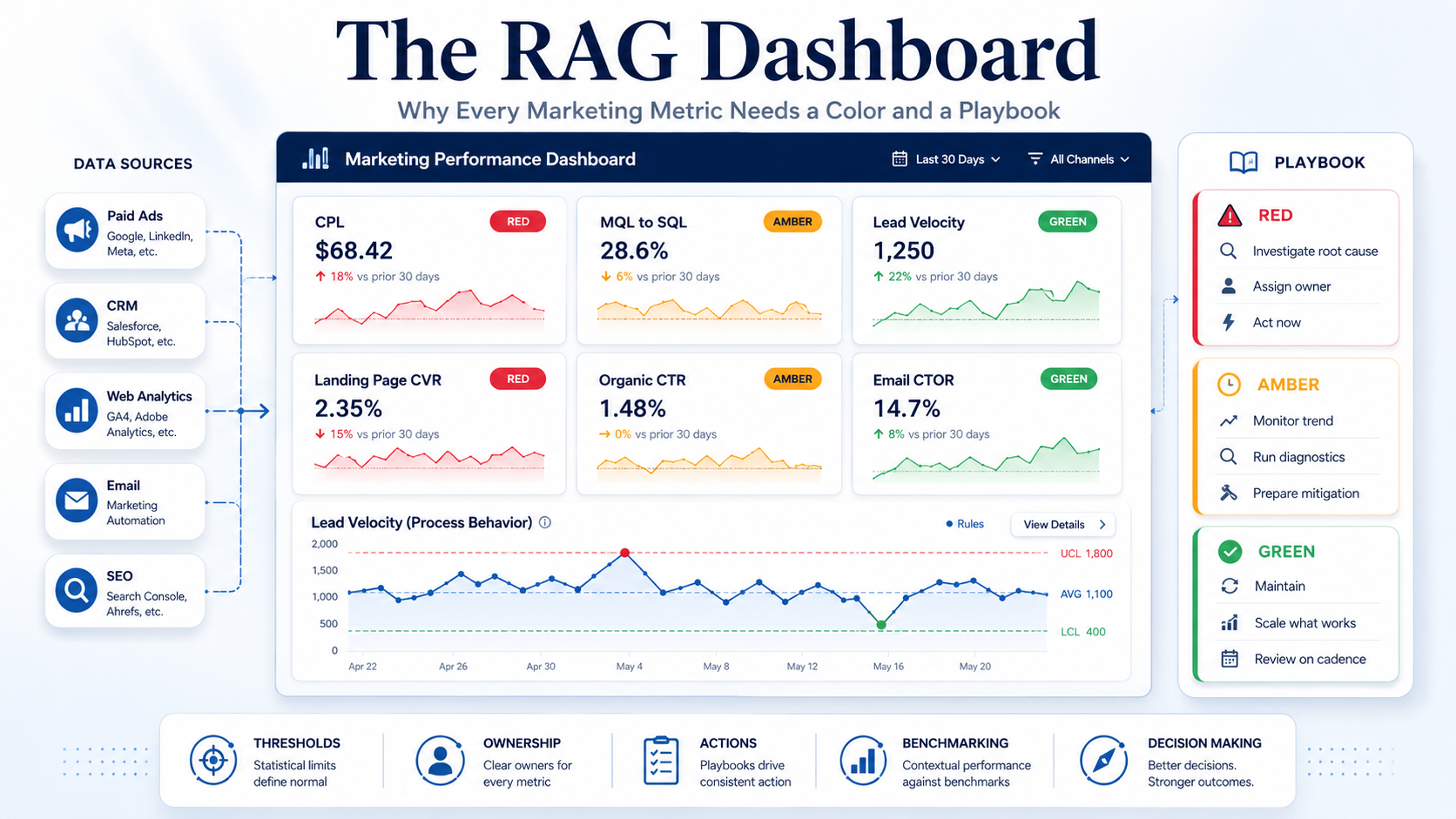
The RAG Dashboard: Why Every Marketing Metric Needs a Color and a Playbook
TL;DR
- Standard marketing dashboards fail not because they have too little data but because they have no action signal; the fix is to assign every metric a Red/Amber/Green status against internal benchmarks and pre-map a specific diagnostic playbook to each status.
- Set thresholds statistically, not by gut: use process behaviour (XmR) charts with Donald Wheeler’s natural process limits (Average ± 2.660 × average moving range) so that Amber/Red reflect genuine signals rather than routine noise.
- Implement RAG with conditional formatting in Power BI/Tableau/Looker, cap dashboards at 4–6 primary KPIs, pair color with icons for accessibility (red-green color blindness affects ~1 in 12 men), and require that every Amber and Red carries a named owner and a mitigation action.
Key Findings
The problem is actionability, not data volume. Practitioners overwhelmingly cite “metric overload” and “vanity metrics” as the core failure of marketing dashboards. The actionable test is simple: if a number moves and your strategic response is “a shrug,” it is decoration, not data.
RAG is an established BI methodology, not a novelty. Red/Amber/Green traffic-light reporting is documented across project/portfolio management, the Balanced Scorecard, and KPI scorecards. Its surface value is “simplicity and immediacy” — but its real value comes from the actions it triggers, not the colors themselves.
Internal benchmarks beat industry benchmarks. Industry averages are contaminated by definitional drift and seasonality. Statistical Process Control (SPC) — specifically Wheeler’s XmR / process behaviour charts — gives a rigorous, self-referential way to separate signal from noise.
Each metric needs pre-mapped diagnostics. This report maps specific Red/Amber/Green logic and diagnostic actions across campaign analytics, demand generation, email, content/SEO, and audience quality.
Details
1. The problem with standard marketing dashboards
Modern marketing teams pull data from Google Ads, GA4, Meta, LinkedIn, and the CRM into dashboards stuffed with every available metric. The result is data overload: decision-makers see pageviews, followers, open rates, and click-through rates but still cannot tell what matters or what to do next.
The recurring critique across respected practitioners is the distinction between vanity metrics and actionable metrics. A vanity metric looks impressive but does not connect to revenue, can be inflated simply by spending more, and — most importantly — does not inform action. The diagnostic question, repeated across the literature: “If this metric increased or decreased by 50%, what specific action would I take?” If you cannot write a clear answer, the metric should come off the dashboard. Improvado
This connects to a deeper analytics concept: the “last-mile” problem. The analytics journey is not complete when a dashboard is delivered — it is complete when a decision changes. Thomas Davenport’s foundational HBR article “Competing on Analytics” (January 2006) framed analytics as the ability to “collect, analyze, and act on data” — the act being the differentiator between firms that compete on analytics and those that merely collect it. Cassie Kozyrkov, Google’s first Chief Decision Scientist, frames data science itself as “a discipline of decision making, turning information into action.” A dashboard that informs but does not catalyze action has failed the last mile. Harvard Business Review
The RAG framework is a direct structural fix: it forces every metric to declare a status (which demands a threshold) and pairs that status with a pre-defined action (which closes the last mile).
2. The RAG framework in marketing measurement
RAG = Red, Amber (Yellow), Green — a traffic-light system where Green means on track, Amber signals caution, and Red is an alert demanding action. It is widely documented in project/portfolio management and KPI scorecard methodologies (Balanced Scorecard, Strategic Planning Process), and increasingly applied to marketing performance management.
Core mechanics for marketing:
- Map each metric to threshold bands. Pick a KPI, define numeric thresholds for Green/Amber/Red, then color by band. Always specify whether “higher is better” or “lower is better” per metric (CAC, CPL, bounce, and unsubscribe are all “lower is better”).
- Separate execution from outcomes. A campaign can be Green on execution (launched on time) and Red on outcomes (underperforming). Don’t blend them into one color.
- Pair RAG with a trend arrow (up/down/flat) so Amber doesn’t become “permanent wallpaper.”
- Predefine the response for Amber and Red — review cadence, owner, mitigation plan, decision rights. This is the non-negotiable core: RAG only works when every Amber or Red item carries a mitigation plan that can be tracked.
- Use a Gray/”Unknown” status when data is incomplete or delayed — don’t guess and color it Green.
The opinionated stance: a RAG dashboard without a pre-mapped action playbook for each color is just a prettier vanity dashboard. The color is the trigger; the playbook is the product.
3. Setting internal benchmarks (the statistical core)
The biggest mistake in RAG marketing reporting is setting thresholds arbitrarily (“Green if above 90%”) or by borrowing industry averages. Both produce false alarms and missed signals.
Why industry benchmarks mislead. Published MQL-to-SQL rates “vary so widely” mainly because teams define “MQL” differently — broad-pool vs. ICP-filtered. Email open rates are inflated by Apple Mail Privacy Protection (roughly 20–50% of recorded opens are machine-generated). Landing-page medians blend B2C and B2B that share no basis. Benchmarking a SaaS company against a blended average that includes HVAC and insurance is “measuring against the wrong standard.”
The rigorous alternative: process behaviour charts (XmR). Donald Wheeler’s Understanding Variation: The Key to Managing Chaos (SPC Press) is the canonical management text; in its second edition Wheeler renamed the “XmR chart” the “Process Behaviour Chart” and “control limits” the “Natural Process Limits.” The method separates routine variation (noise inherent in the system) from exceptional variation (a real signal that something changed). The mechanism:
- Plot the metric over time (a run chart).
- Compute the centerline (the average of a baseline period).
- Compute Natural Process Limits = Average ± 2.660 × (average moving range), where the moving range is the absolute difference between successive values. The moving-range chart’s upper limit = 3.268 × (average moving range).
- The constant 2.660 derives from 3 ÷ d₂, where d₂ = 1.128 is the bias-correction constant for successive differences (subgroups of n=2); 3.268 is the D₄ constant for n=2. (Wheeler offers one other “correct” method — using the median moving range with constants 3.145 and 3.865.)
Why 3-sigma limits? They are not probability limits and do not assume a normal distribution. Wheeler’s justification is empirical: as he puts it in Quality Digest, “Three-sigma limits filter out nearly all probable noise (the common-cause variation) and isolate the potential signals (the assignable-cause variation).” They minimize the combined economic cost of two mistakes — overreacting to noise and missing real signals — and hold across virtually any distribution (>99% of values fall within them even for heavily skewed data). As Wheeler and Chambers state in Understanding Statistical Process Control, “Three-sigma limits are not probability limits… the strongest justification of three-sigma limits is the empirical evidence that three-sigma limits work well in practice.” Quality DigestTripp Babbitt’s Blog
Wheeler’s detection rules (use three, no more). A metric flags as a signal when:
- A single point falls outside the natural process limits (a dominant, exceptional cause).
- Run of Eight — eight consecutive points on the same side of the centerline (a weak but sustained shift).
- Three out of four successive points in the outer quarter (within the upper or lower 25% zone near a limit) on the same side (a moderate, sustained shift).
Wheeler explicitly recommends these three as sufficient; adding more rules is “counterproductive, as it leads to overreacting” (note: some software uses “nine in a row” for the run rule, but Wheeler’s published management standard is eight). Deming Alliance
This maps cleanly to RAG:
- Green = within the natural process limits, no run signal (routine variation — leave the system alone).
- Amber = a run-based early warning (Rule 2 or 3 triggered, or a point approaching a limit) — investigate but don’t overreact.
- Red = a point beyond the limit (Rule 1) — exceptional cause, act now.
Practical alternatives where SPC is too heavy: rolling-average bands, percentile-based bands (e.g., Green ≥ your trailing 75th percentile, Red ≤ 25th percentile), or standard-deviation bands. Minimum data: useful “trial” limits can be built from as few as 5–6 data points; Wheeler prefers 12–24 points for stable limits. Revisit thresholds on a set cadence (quarterly) or when strategy changes — changing thresholds every week makes RAG meaningless.
4. The three RAG categories applied to real marketing metrics
Below, each metric gets a benchmark logic and a pre-mapped diagnostic action set. Thresholds shown are illustrative starting points — calibrate to your own process limits.
CAMPAIGN ANALYTICS
Landing page conversion rate. An internal benchmark beats the cross-industry figure. Unbounce’s 2024 Conversion Benchmark Report — analyzing 57M conversions across 41,000 landing pages and 464M visitors — puts the median at 6.6% across all industries; SaaS is the lowest tracked at 3.8%, financial services 8.4%, and events/entertainment the highest at 12.3% (B2B MQL-level conversions often run just 1–3%). Diagnostic logic: a conversion rate well below your own trailing baseline, especially segmented by traffic source, signals message mismatch between ad and page. Action map: Red → check ad-to-page message match first (sending paid traffic to a generic homepage suppresses conversion 4–5x); Amber → A/B test headline/CTA and reduce form friction; Green → hold and document the winning pattern.
Bounce rate by keyword/ad group (and as an audience-quality proxy). In GA4, bounce rate is now the inverse of engagement rate — a session is “engaged” if it lasts >10 seconds, has 2+ pageviews, or triggers a key event. Action map: Red (high bounce on a paid keyword) → ad/page relevance mismatch; pause or re-route the keyword and align landing content; Amber → review intent match; Green → expand the keyword. Neil Patel
Click-through rate by ad creative (creative fatigue). CTR decline is the earliest fatigue signal. Practitioner thresholds: a CTR drop of ~15–20% week-over-week, or frequency exceeding ~3 (prospecting) / ~5 (retargeting), flags fatigue. Action map: Red (CTR down 20%+ over two weeks AND below baseline) → refresh creative (a hook swap can reset the algorithm); Amber (10–15% decline) → brief replacement concepts now; Green → keep live but keep one fresh variant in the pipeline. Critically — benchmark against the creative’s own launch baseline, not an industry average.
Cost per lead / Cost per MQL. CPL tolerance scales with deal value; there is no universal “good” number. Action map: Red (CPL spikes 20%+ MoM with no offer change) → the auction is usually the cause; check competitive pressure and Quality Score before blaming the team, and verify the leads convert downstream (track effective CPL per opportunity, not raw CPL); Amber → shift budget toward higher-converting channels; Green → scale spend.
Quality Score (Google Ads). This is itself a diagnostic tool, not a KPI to optimize directly — Google states it “should not be optimized or aggregated with the rest of your data.” It has three components, each rated Below/Average/Above average: Expected CTR, Ad Relevance, Landing Page Experience. Action map (per Google’s own guidance): “Below average” Expected CTR → rewrite ad copy/CTA; “Below average” Ad Relevance → restructure ad groups and tighten keyword grouping; “Below average” Landing Page Experience → align the page to keyword intent, improve speed and mobile-friendliness. Start with high-spend keywords showing “Below average” on any component.
DEMAND GENERATION / PIPELINE
MQL→SQL conversion rate. The single most diagnostic mid-funnel metric. First Page Sage’s 2026 report (client data 2019–2025) and the older Implisit study both put the cross-industry average at 13% (with website leads ~31%, referrals ~25%, and webinars ~18%, taking ~84 days to convert); B2B SaaS typically runs higher. Practitioner audit rule: when MQL→SQL falls below ~10–15%, the cause is almost always lead-scoring criteria or SDR follow-up speed, not lead volume. Action map: Red → audit the MQL definition and marketing/sales alignment on “qualified,” and segment by channel to find sources that pad volume without pipeline; Amber → tighten scoring; Green → maintain.
Lead Velocity Rate (LVR). Month-over-month growth in qualified leads. Jason Lemkin (SaaStr) calls it the most strategically important SaaS metric because it is a real-time leading indicator: “Qualified Lead Velocity Rate (LVR) is real-time, not lagging, and it clearly predicts your future revenues and growth.” He notes “your MRR growth will follow your LVR growth by about 4–5 months, maybe 6 in a longer sales cycle,” and ran a 10%/month LVR target at EchoSign. A common rule of thumb is to set LVR 10–20% above your target MRR growth. Action map: Red (declining LVR) → an early warning of a future revenue gap; investigate top-of-funnel channels before the revenue dip arrives; Green → prepare sales capacity for the coming volume. HubSpot + 2
Pipeline coverage ratio. The rule of thumb is 3:1 (adjust for win rate — a low win rate may need 5–6x). Action map: Red (≤1.5x going into a quarter) → signals trouble meeting quota; launch pipeline-acceleration campaigns/ABM now; Amber (2–3x) → push to source more deals by mid-quarter; Green (≥3x) → hold.
Time to first contact (speed-to-lead). The MIT/InsideSales research by Dr. James Oldroyd, popularized by HBR’s 2011 “The Short Life of Online Sales Leads” (drawing on 15,000+ leads and 100,000+ call attempts across 100+ companies, 2004–2007), found that “the odds of qualifying a lead if called in 5 minutes versus 30 minutes drop 21 times” and the odds of contacting the lead drop 100 times; across HBR’s broader sample of 2,241 US companies, average first-response time was ~42 hours. Action map: Red (median response >1 hour) → automate routing/alerting; this is “a leak the size of your ad spend”; Amber (5–60 min) → tighten the SLA; Green (<5 min) → maintain. OnecavoOctavius AI
EMAIL MARKETING
Open rate by segment. Treat as directional only post-Apple MPP. Action map: Red (low opens vs. your baseline) → subject line, sender reputation, or list-hygiene problem; Amber → segment more tightly; Green → maintain cadence.
Click-to-open rate (CTOR). The purer content/offer metric — clicks ÷ opens — because it isolates content quality from deliverability. A healthy CTOR sits in roughly the 10–20% range (some sources cite 20–30% as strong). Action map: Red (low CTOR with normal opens) → content/offer-to-subject mismatch; realign subject line, CTA, and offer; Amber → reduce clicks-to-action friction; Green → hold.
Unsubscribe rate. A list-health early warning. Below ~0.5% per campaign is healthy; a rising rate signals frequency or relevance problems. Critical deliverability threshold: spam-complaint rate must stay below 0.1% (the Gmail/Yahoo bulk-sender requirement). Action map: Red (spike, or complaint rate near 0.1%) → cut frequency, re-segment, and audit list acquisition immediately; Amber (drifting up) → review cadence; Green → maintain.
CONTENT / SEO
Organic CTR by position. Benchmark your CTR against the expected CTR for your actual ranking position, not a blended site average. Backlinko’s analysis of 4 million Google results puts average position-1 CTR at 27.6% (“the top spot is ten times more likely to get a click than the tenth spot”), but AI Overviews have materially cut top-position CTR since 2024. Action map: Red (CTR well below the benchmark for your position) → rewrite title tag and meta description; Amber → test SERP-feature optimization; Green → hold. NumeroagencyBacklinko
Pages per session / engagement (content visitors). In GA4, 2+ pageviews is one trigger for an engaged session. Action map: Red (low pages/session from content) → weak internal linking and CTAs; add contextual links and next-step CTAs; Amber → review content-to-intent match; Green → maintain.
Keyword ranking movement (volatility). Use the XmR logic directly: routine daily rank wobble is noise. Action map: Red (a point outside the natural limits, e.g., a sustained multi-position drop) → investigate algorithm update, technical issue, or lost backlinks; Amber (a run signal) → monitor; Green → leave it alone (do not “optimize” routine variation).
AUDIENCE QUALITY
Bounce rate / session duration / form completion as intent signals. Bounce (the GA4 engagement inverse), session duration, and form-completion rate together proxy audience quality. Form completion is especially diagnostic: completion drops sharply past 5–7 fields (HubSpot found cutting fields lifts completion, and one widely cited test went from 11 fields to 4 for a large gain), and high-friction fields (phone, budget) suppress completion most. Action map: Red (high bounce + short sessions from a channel) → audience/targeting mismatch; the traffic source is wrong, not the page; Amber → refine targeting; Green → scale the source. For forms: Red (low completion on a long form) → cut fields or split into steps; move high-friction fields to progressive profiling.
5. Examples across channels/functions
The framework generalizes into role-specific RAG rows. A paid-search analyst’s row: Quality Score components, CPL vs. process limits, landing-page conversion by ad group. A demand-gen leader’s row: LVR, MQL→SQL, pipeline coverage, speed-to-lead. An email manager’s row: CTOR, unsubscribe, complaint rate. An SEO’s row: organic CTR by position, ranking volatility (XmR), engagement rate. Each cell is a color plus a one-click link to the diagnostic playbook for that color.
6. Implementing RAG in practice (BI tools and cadence)
Power BI: Use conditional formatting (background color, font color, or icon sets) on table/matrix cells, or the dedicated KPI/Card visuals. Microsoft’s documentation and practitioners converge on: traffic-light conditional formatting for instant status, a DAX measure to compute KPI status (e.g., a SWITCH returning Red/Amber/Green and a paired arrow via UNICHAR), and capping a report at 4–6 primary KPIs because too many callouts “dilute their value.” DATA GOBLINS
Tableau / Looker / Looker Studio: The same pattern — calculated fields/dimensions that bucket a metric into three bands, then a color encoding paired with a shape or icon.
Accessibility (non-negotiable): Red-green color vision deficiency affects roughly 1 in 12 men (~8%) and 1 in 200 women, so never rely on red/green alone — pair every color with an icon, arrow, or text label. Blue/orange is a colorblind-safe alternative.
Cadence: Review active-campaign metrics weekly, automation/lifecycle metrics monthly, and re-baseline thresholds quarterly. Automate threshold alerts so a breach triggers a workflow (ticket, root-cause checklist, or optimization playbook) rather than waiting for a human to notice.
The implementation principle: the color is computed automatically from internal benchmarks; the action is documented and owned. Build a “KPI Definition Sheet” per metric recording the calculation, the threshold logic, the owner, and the Red/Amber/Green action map.
7. Common mistakes in RAG-based marketing reporting
- Arbitrary thresholds. Setting bands by gut feel instead of process limits or percentiles produces constant false alarms.
- Industry benchmarks as thresholds. Definitional drift and seasonality make them misleading; benchmark against your own history.
- Permanent Amber. Without a trend arrow and a mitigation deadline, Amber becomes wallpaper everyone ignores.
- Color without a playbook. The most common failure — a pretty dashboard that still doesn’t tell anyone what to do.
- Changing thresholds too often. Re-tuning weekly destroys comparability and meaning.
- Coloring missing data Green. Use Gray/Unknown for incomplete or delayed data.
- Blending execution and outcome status into one color.
- Averaging problems into invisibility in portfolio rollups — use “Red if any Tier-1 KPI is Red,” not a blended average.
- Overreacting to routine variation — treating every down-tick as Red. Wheeler’s whole point: most variation is noise, and reacting to it (“Chicken Little”) creates chaos.
- Relying on color alone (the accessibility failure).
Recommendations
Stage 1 — Audit (week 1). List every metric on your current dashboards. For each, write the action you’d take if it moved 50%. Delete any metric with no answer. This alone removes most vanity metrics.
Stage 2 — Benchmark (weeks 2–3). For each surviving metric, pull 12+ periods of history and compute either XmR natural process limits (rigorous) or percentile bands (pragmatic). Define Green/Amber/Red numerically. Document “higher/lower is better.”
Stage 3 — Map actions (week 3). For every metric, write the Red and Amber playbook: the first diagnostic step, the owner, and the decision right. Store it in a KPI Definition Sheet.
Stage 4 — Build (week 4). Implement conditional formatting in your BI tool, capped at 4–6 primary KPIs per view with drill-through for detail. Pair color with icons. Add trend arrows.
Stage 5 — Operationalize. Set a review cadence (weekly active, monthly lifecycle), automate alerts, and re-baseline quarterly.
Thresholds that should change the recommendation: if your re-baselined process limits show a sustained shift (Wheeler Rule 1 or Rule of Eight), reset the centerline — don’t keep flagging the new normal as Red. If a metric stays Amber for 3+ consecutive periods with no action taken, either escalate ownership or retire the metric.
Caveats
- Many benchmark figures circulating online (MQL→SQL rates, landing-page medians, CTR-by-position) come from vendor blogs and aggregators that repackage a small number of primary datasets (Unbounce, First Page Sage, Backlinko/Advanced Web Ranking, MIT/InsideSales via HBR). Treat all external numbers as directional context, not targets — the entire thesis is that your internal benchmark is what matters.
- Post-Apple-MPP, email open rate is materially inflated by machine opens; lean on CTOR, click rate, and downstream conversion.
- GA4 bounce/engagement definitions differ fundamentally from Universal Analytics — do not compare across the two.
- AI Overviews are actively reshaping organic CTR curves; position-based CTR benchmarks from before 2024 overstate traffic.
- SPC/XmR assumes successive values are “logically comparable” (the same system of causes); don’t mix seasonal apples and oranges in one chart, and treat limits built from fewer than ~12 points as provisional “trial” limits.
High-authority external sources to cite
- Google Ads Help — “About Quality Score” and “5 ways to use Quality Score to improve your performance” (the per-component Below/Average/Above-average diagnostic logic, and the statement that Quality Score should not be optimized or aggregated).
- Google Analytics Help — “[GA4] Engagement rate and bounce rate” (the engaged-session definition: >10 seconds, 2+ pageviews, or a key event).
- Harvard Business Review — “Competing on Analytics,” Thomas H. Davenport (2006) and “The Short Life of Online Sales Leads” (2011) (the act-on-data thesis and the 5-minute/21x/100x speed-to-lead findings).
- Donald J. Wheeler, Understanding Variation: The Key to Managing Chaos (SPC Press) and spcpress.com / Quality Digest “Three-Sigma Limits” (the XmR method, the 2.660/3.268 constants, the three detection rules, and the empirical justification for 3-sigma limits).
- Unbounce Conversion Benchmark Report (2024) (median landing-page conversion 6.6%; SaaS 3.8%).
- First Page Sage — MQL-to-SQL Conversion Rate report (13% cross-industry average).
- SaaStr / Jason Lemkin — “Why Lead Velocity Rate Is The Most Important Metric in SaaS” (LVR as a leading indicator; MRR follows LVR by ~4–6 months).
- Backlinko — “We Analyzed 4 Million Google Search Results” (position-1 organic CTR ~27.6%) and Advanced Web Ranking’s Organic CTR tool (position/SERP-feature benchmarks).
- Microsoft Learn — “Apply conditional formatting in tables and matrices” / KPI visuals (RAG implementation in Power BI).